

Photography Tips, Tricks, Ideas and Resources for Wineries
Finding a Photogapher
Ask your network for referrals
Searches for wine photographers or photographers in your wine region
Check out their website and ask to see additional work if you want to see more of one type
Have a discovery call and check their vibe with yours!
Usage Licensing
Usage licensing in photography is all about rights to the photograph. As soon as the photographer clicks the shutter, that photographer owns the copyright to that image. The usage license outlines how the photographer is allowing you, the client, the use those images. This is where pre-production meetings and contract review is extremely important. Understand from the very beginning how you are allowed to use the images.
It is a common misunderstanding that when you hire a photographer to take an image, that you, the client, owns all rights to that image. In reality, that image is the work product of the photographer and they own the copyright to it and control all usage. Usage can be anything from how long the client is allowed to use the image to where the image can be used. Photographers may charge more for a perpetual license and they may charge more for a national commercial. To reiterate what I said before, when you find a photographer you like, all of this needs to be discussed clearly before any contracts are signed and before any work is started.
Common usages: social media, website, email marketing, other digital, digital advertising, print advertising, billboards, marketing collateral, press kits
Bottle Shots
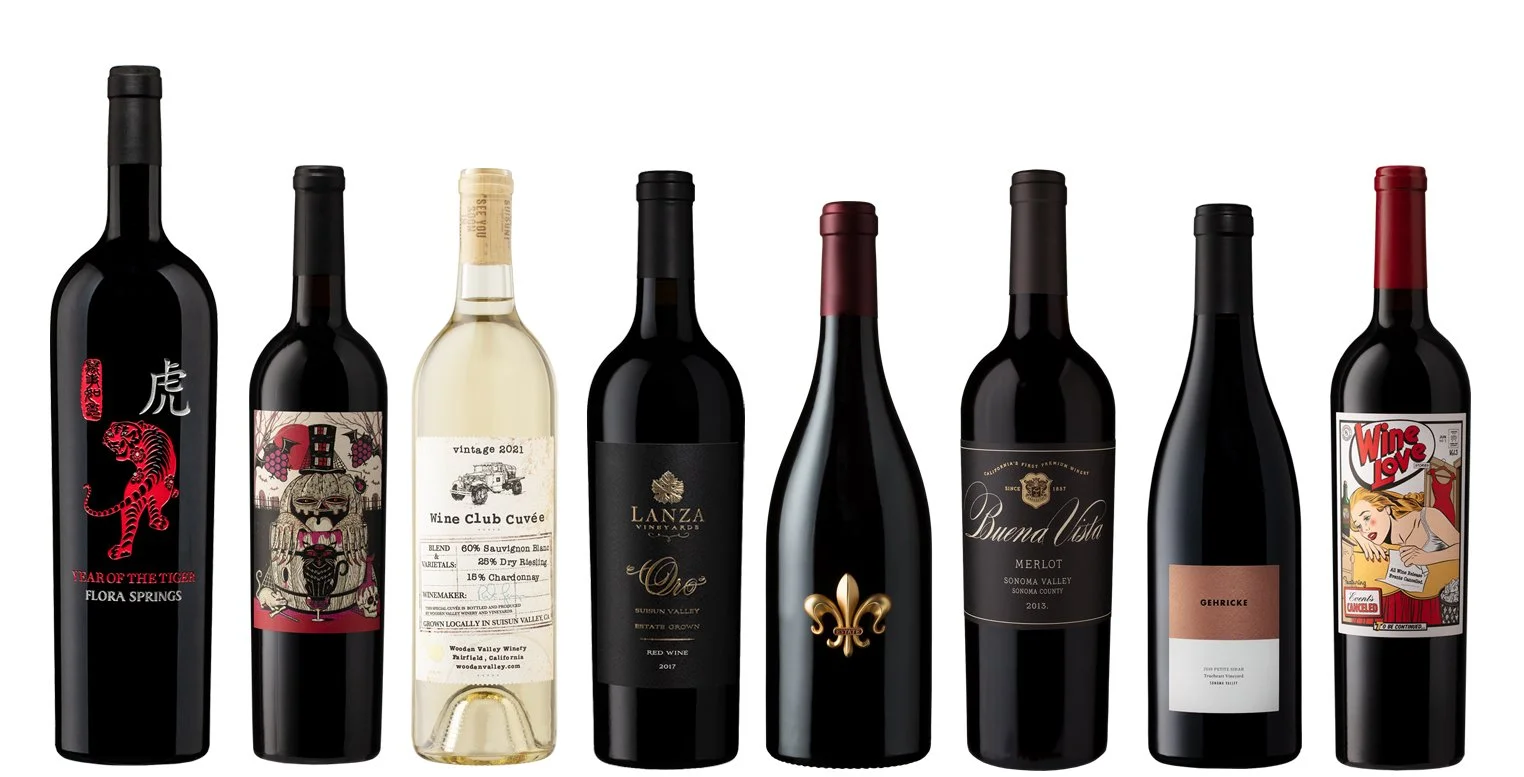
Glass and liquids are notoriously hard to shoot. If you’ve ever tried to shoot your bottle with your phone, I’m sure you can relate! Sending your finished bottle off to a pro for a bottle shot is recommended – they’ll make your bottles look incredible and you’ll be confident when you add them to your Shop page on your website for e-commerce, when you send to press inquiries, and when you add them to print collateral.
Asset Libraries
Content Checklist for Wineries
Bottle shots
Beauty photography/videography done in-studio, high production value
Seasonal imagery and videos
Your space
Bottling
Labeling
All other production
Harvest
Vineyards
Winemaking
Lifestyle (people enjoying your wines, hands holding glasses, pouring, swirling, scenes like picnics, dinner al fresco, whatever scenes are on brand for you)Creating Content
This list can be and should be a mix of professional photography and your own with whatever camera you have on you.
When shooting a subject, shoot from multiple angles - up, down, right, left, macro, wide angle, with people, without people, with a prop, without a prop...basically every way you can think of. You'll use all of those images in some way. If you take the time to create a beautiful, robust cheese & charcuterie board, shoot it from all different angles: the whole board, close ups of the pieces and parts, and added in the human element. This creates a set of dynamic photographs you can use in email campaigns, social media and other marketing materials.
With your own images, you can do what you want with them. If you hire a professional photographer, understand how you are allowed to manipulate them. If you’re able to, crop images from your existing asset library in new ways - zoom into one section of the image, angle the image differently, make it square or very tall & skinny/short & wide.
Keep these shoots going. You will need fresh imagery constantly, so continue to fill the asset library with new images!
Editing Content
Photos/videos straight out of the phone are ok - not bad, but not great. And they’re probably not in your brand style. Use editing tools to get them there! Adjust contrast, brightness, whites, blacks, temperature, sharpness - whatever it takes to improve the image/clip. If you don’t know what something does, slide all the way to each side and watch the image change. Try to match your brand’s visual style as much as possible.
Make slideshows out of static images
Create moving text over an image to create a video file
Put multiple images and videos together in a Reel for Instagram and Facebook. Repurpose that Reel on other platforms.
DIY Photography
Shooting Bottles Is Hard
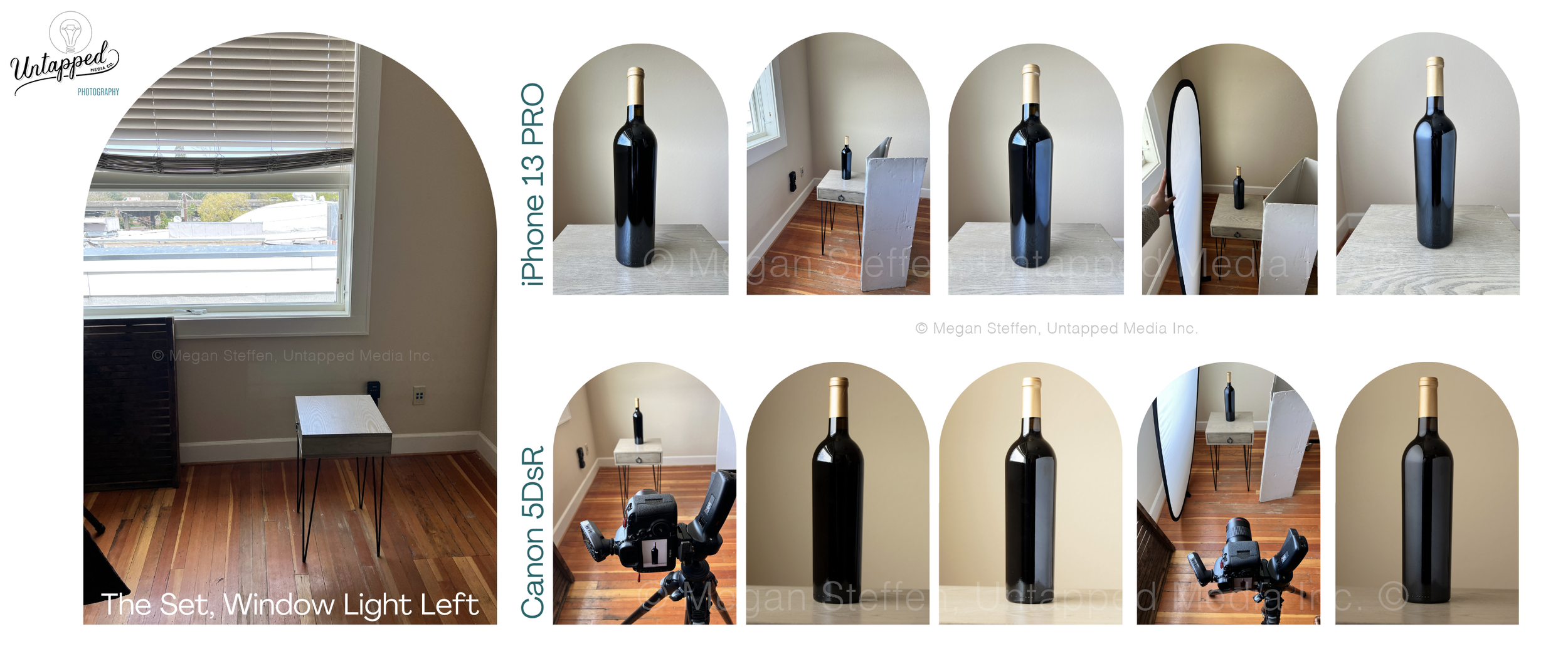
In this blog post, I share tips on how to DIY some bottle photography. Bottles and the wine itself present challenges with reflections and refraction. Here are a few tips on how to manage those reflections:
Diffuse, diffuse, diffuse. Take the cover off of a 5-in-1 reflector to use just the diffusion panel. Invest in high quality diffusion gel. Use tracing paper. Heck, use wax paper. Use anything between your light source and your bottle to diffuse the light.
Look at each reflection (overhead lights, windows, people in the room, other objects) and identify where they’re coming from. Use big black boards around the bottle to block every light source.
Manage those reflections with boards, diffusion, repositioning. Move yourself, move the bottle, move the light source. Find the light you like.
Content Tips
Take photos and videos of everything always.
Seriously, always. Constantly. Everywhere you go, everything you do, document it. At some point in the future, that photo or video will support a piece of content for social.
Take your product with you wherever you go. You can pop that product into your weekend getaway to Tahoe, the side of the road with an amazing sunset, on your dinner table, on a picnic in the park - the options are endless!
Collect images & videos from your extended team. If you have a team of people at your company, ask them to send in photos from their arm of the business. Even if the images aren't perfect, there are plenty of apps out there to help them along.
Resources
Content Creation/Editing Apps
Adobe Express
Canva
Unfold
Capcut
VSCO
SCRL
Remix
Native smartphone photo editing
Instagram editing